Install it and connect Telegram
Running Setup.exe, the one administrator prompt, connecting Telegram (which starts your free trial), and the first update.
Updated 2026-10-05
What it does#
Setup.exe puts the updater on the server, allows it past Windows Defender, and opens the setup page for your cafe. On that page you connect Telegram - that starts your free trial - sign in the launchers, and then start the first full update from your dashboard. The install itself takes a minute or two and asks you nothing.
How to use it#
On the SERVER that holds the game disks:
- Double-click Setup.exe. It carries the whole program - there is nothing to unzip beside it. Windows asks once for administrator rights - choose Yes.
- A setup window shows each step with a progress bar. When it finishes, the setup page opens in your browser and the window lists what is ready and what still needs you.
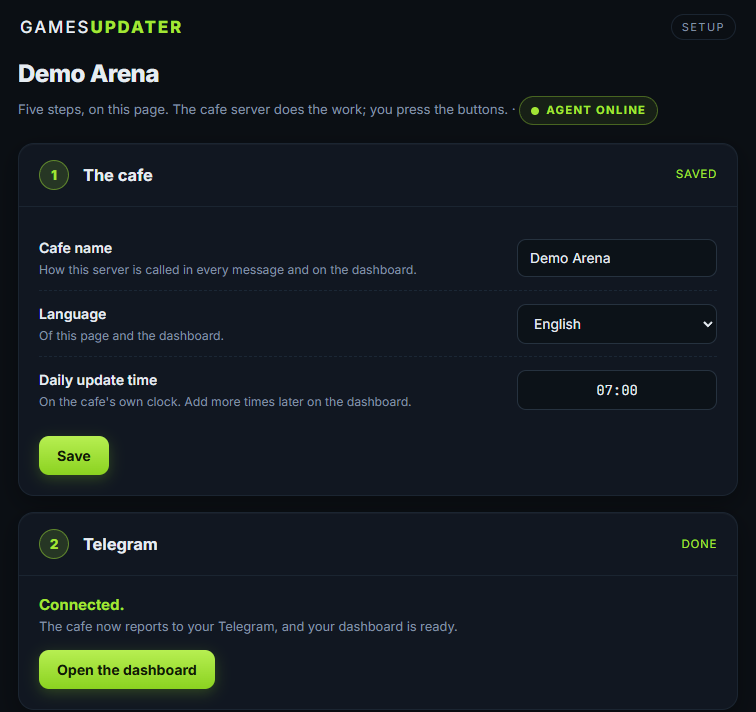
- On the setup page, connect Telegram (scan the code, or open the link and press START). This starts your free trial, and the bot answers with your cafe's name.
- Sign in the launchers - or store their logins on the page and press "Sign in now"; the updater then signs in by itself. The bot walks you through the same steps in Telegram - see First-time setup.
- When every launcher is signed in, start the first full update from your dashboard (or the button the bot sends). It takes 20-60 minutes; do not use the server's mouse or keyboard meanwhile. After that the nightly update runs by itself.
If Windows says "Windows protected your PC", click More info, then Run anyway.
The install ends in your browser, on the setup page for this cafe. The same page is behind the GameUpdater - Connect Telegram shortcut on the server desktop:
Once Telegram is connected the bot greets you and says when your trial ends:
Why administrator, once: the updater reads the screen and types into launchers to keep them going, and Windows Defender mistakes that for malware. Setup adds the exclusion for the GameUpdater folder on drive C first, then installs. If an antivirus still removes it, add that GameUpdater folder (drive C) to its exclusions by hand and run Setup.exe again.
The free trial#
- It starts when you connect your own Telegram (a private chat, not a staff group).
- One trial per Telegram account. More cafes you connect to the same Telegram during the trial join it and end on the same date.
- Without Telegram, your provider activates the server for you.
- A cafe that cannot get a trial (for example because you already have a paid cafe) waits for your provider; the bot says so, and your provider is told at once.
What the reply means#
Setup.exe's last page and install-log.txt (saved next to Setup.exe) end with the same list: what is READY and what NEEDS YOU. The bot repeats that list as steps, one at a time.
Until the launchers are signed in, the nightly update does not start them: it tells you in Telegram which ones still need you. Once they are all signed in - or after 3 days at the latest - it runs normally.
Important: "Windows auto-login: OFF" is the one warning worth acting on. The updater runs as a normal user, because launchers need a desktop, so it only runs while the server is logged in. After a power cut a server that stops at the login screen does nothing - no updates, no bot - until somebody signs in on it. Set Windows to log in automatically and that cannot happen.
When something needs you#
- Setup.exe is blocked or removed by an antivirus. Ask your provider for the zip with Install.bat - it does exactly the same.
- The setup page did not open. Double-click "GameUpdater - Connect Telegram" on the server desktop. If the link opens Telegram but nothing happens - which Telegram does when you already have a chat with the bot - type the 6-digit number shown under the code on the setup page.
- "This cafe is waiting for activation by your provider". No automatic trial for this cafe - your provider has been told and activates it.
- Nothing arrives in Telegram at the nightly hour. Check that the server is logged in, then send /status.