The nightly report, line by line
How to read the message the bot sends after each night, group by group.
Updated 2026-09-24
What it does#
After every run the bot posts one message about your cafe. It is grouped by launcher, newest first in the sense that matters: what was downloaded, then what needs you.
A real one, from a cafe server (account names blurred):
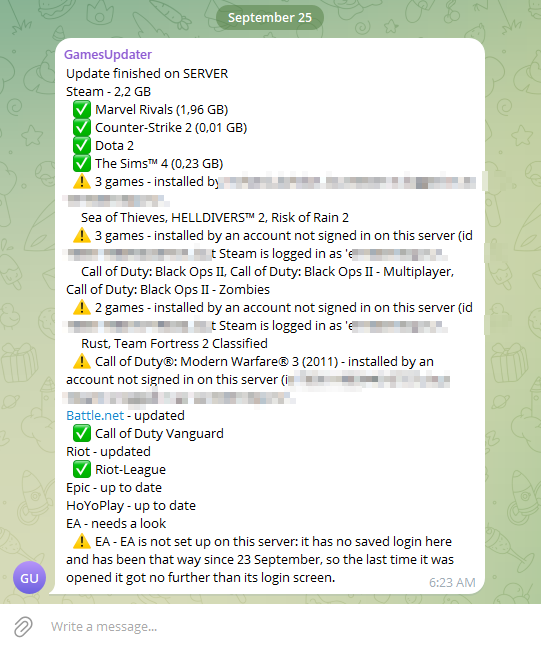
The same shape with demo names, line by line:
✅ is a game that really moved to a new version. ⚠️ is something that needs a person - here a Steam game bought on an account this cafe has not stored, and a signed-out EA app.
How to use it#
Read it top to bottom:
- The header names your cafe and the server, so a group with several cafes stays readable.
- A launcher line is either a total ("Steam - 40.06 GB"), "updated" when the sizes were not measurable, "up to date" when there was nothing to do, or "needs a look".
- A game line under it is one game that really moved to a new version, with what it pulled.
- Anything that needs a person comes last, one line per reason, naming the games it holds up.
What the reply means#
| Line | What it means |
|---|---|
| Steam - 12.4 GB | That launcher downloaded 12.4 GB in total tonight |
| ✅ Dota 2 (0.08 GB) | Dota 2 updated; the size is what it fetched |
| ⚠️ 14 games - Steam is signed out | One cause holding up several games: fix it once, and every game named under it updates |
| ❔ a question mark | The updater could not prove the game moved, so it does not claim it did |
| Riot - up to date | Nothing was waiting for that launcher |
| still downloading when I stopped watching | A big download is still running in the background; the next run confirms it |
| finished downloading after I stopped watching | It completed while the run was busy elsewhere, and the updater checked again before writing to you |
| Apex Legends 1.2.4.0 -> 1.2.4.1 (EA updated this itself since the last run) | The launcher patched it on its own between runs; nobody claims credit, you are just told |
| went BACKWARDS - a reinstall or a rollback? | The version on disk is older than last night. Usually a reinstall; worth a look |
| The nightly did not run at its usual time, so this is the catch-up | The server was off or logged out at the hour; it ran as soon as it could |
Sizes come from the launcher itself, so a game that patched without downloading (a file check, a version bump) shows without one.
When something needs you#
Those lines are collected under one heading with the fix in the sentence. The common ones:
- a launcher that lost its login
- a Steam game installed by a different account
- a security code waiting for you (Steam Guard, Battle.net, EA)
- Windows was locked, so nothing on the screen could be read
Each is explained, with what to do, in When something needs you.
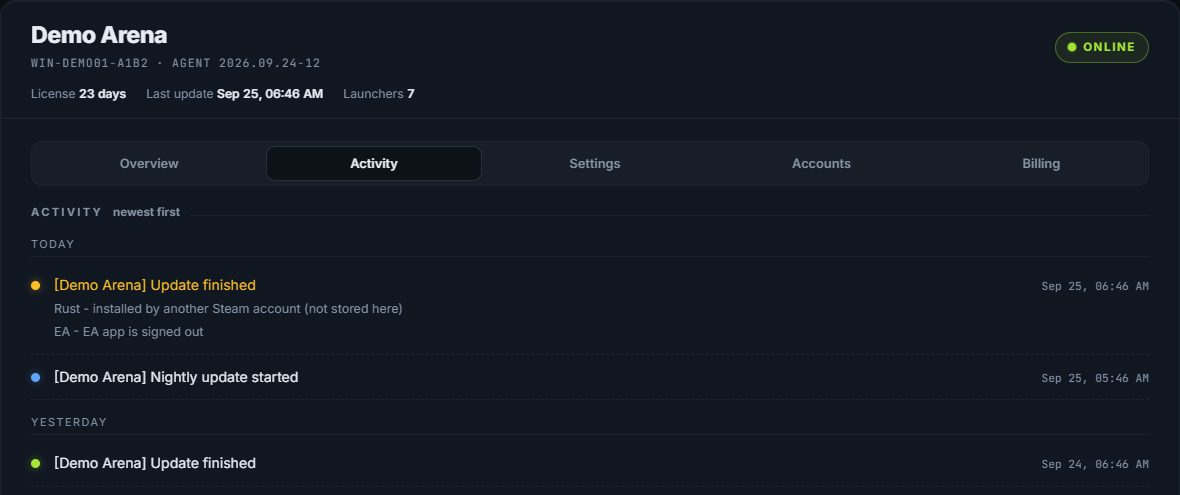
The same report is kept on your dashboard, under Activity, newest first: